MCP for CRM: Connecting Claude and Other AI Assistants to Salesforce and Zoho

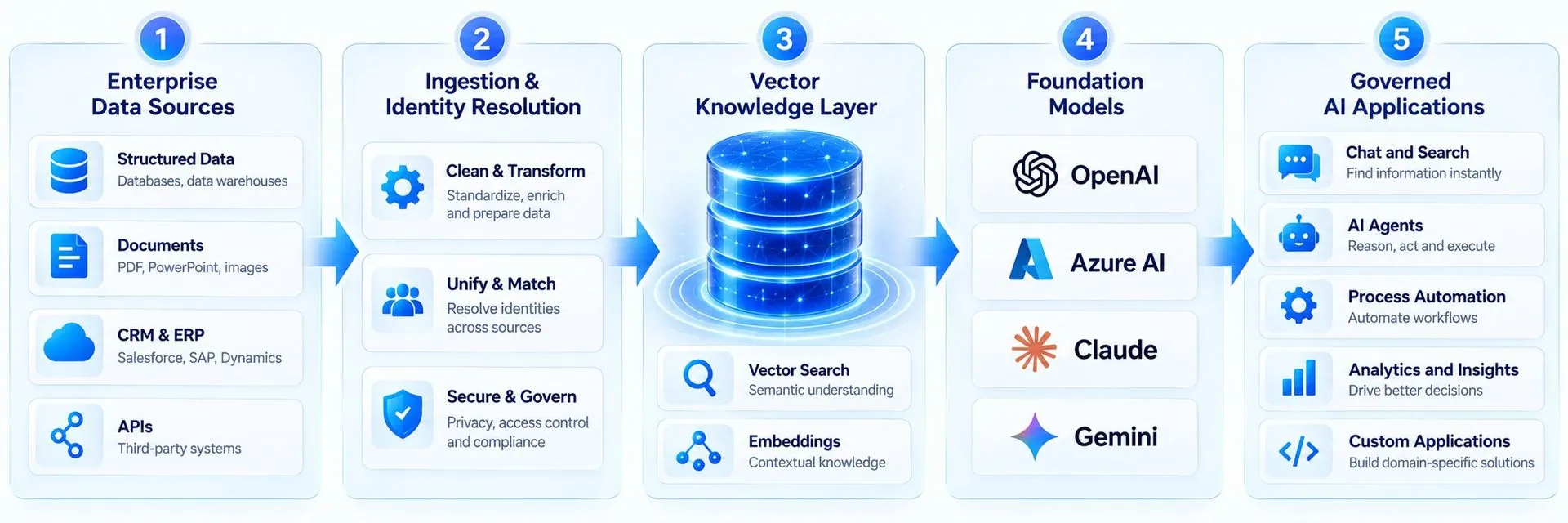
The Model Context Protocol (MCP) is an open standard that lets AI assistants connect to business systems through a common interface. Instead of building a custom integration for every AI tool, a CRM publishes an MCP server, and any compatible assistant, such as Claude, can use it to read data and take actions. In 2026 both Salesforce and Zoho offer MCP servers: Salesforce through Salesforce in Claude, part of its AIforce launch, and Zoho through an MCP server that covers actions across many Zoho apps. This guide explains how it works, what you can do with it and how to stay in control.
How MCP works in plain language
- An MCP server describes the tools a system offers, for example find account, update opportunity or create ticket.
- An MCP client, such as Claude, discovers those tools and decides when to use them while helping a user.
- The user signs in, and the server applies that user's permissions to every request.
- Results come back to the assistant, which uses them to answer or to take the next step.
MCP options for Salesforce and Zoho
- Salesforce in Claude: a prebuilt MCP server from Salesforce and Anthropic with sales skills, announced in beta as part of Claudeforce. Requests run with the user's Salesforce permissions.
- Salesforce developer tools: Salesforce also provides MCP support for developers, including a Salesforce development plug-in for Claude Code.
- Zoho MCP server: exposes actions from more than 15 Zoho applications to any MCP client, within existing permissions, and Zoho Flow can bring third-party tools into the same server.
Useful things teams do with CRM MCP
- Meeting prep: ask the assistant for an account summary, open deals, recent cases and last emails before a call.
- Pipeline updates: dictate notes after a meeting and let the assistant update the opportunity and next steps.
- Cross-system questions: combine CRM data with documents, spreadsheets or other connected tools in one conversation.
- Support triage: summarise open tickets for a customer and draft a reply for an agent to approve.
- Admin and development: inspect metadata, write test data or build components faster with developer tools.
Controls to put in place first
- Start with read-only access for most users; enable write actions for specific roles once you trust the setup.
- Review user permissions in Salesforce or Zoho, because MCP access follows them exactly.
- Decide which AI clients are approved and block unknown MCP servers or plug-ins from being connected.
- Log and review assistant actions, especially updates and deletes.
- Teach users that content from emails, web pages or documents can contain instructions, and that they should check actions before approving them.
MCP vs traditional integrations
MCP does not replace system-to-system integrations such as ERP sync, billing or lead routing. Those still need reliable, scheduled APIs or middleware. MCP is best for people working with AI assistants on demand: asking questions, preparing work and taking small, approved actions.
Frequently asked questions
What is MCP (Model Context Protocol)?
MCP is an open standard that lets AI assistants connect to business systems through MCP servers, which describe the tools and data a system offers. Compatible assistants, such as Claude, can then use those tools within the user's permissions.
Can Claude connect to Salesforce?
Yes. Salesforce and Anthropic announced Salesforce in Claude, a prebuilt MCP server with sales skills, as part of Claudeforce. It runs with the user's Salesforce permissions and was announced as a beta.
Does Zoho support MCP?
Yes. Zoho offers an MCP server that exposes actions from more than 15 Zoho apps to any MCP-compatible client, respecting existing permissions.
Is MCP safe for customer data?
It can be, if access follows least privilege, write actions are limited, connected clients are approved and actions are logged. MCP inherits your CRM permissions, so review them first.
How Quant Tech can help
Quant Tech sets up and secures AI connections to Salesforce and Zoho, from permission reviews and sandbox pilots to custom MCP tools for your own processes. Talk to our team about connecting your CRM to AI safely.
Talk to a Salesforce, HubSpot or Zoho expert—free 30-minute consultation.